Combining
RasterIndex supports concatenation along a single axis through either xarray.concat() or across multiple axes using xarray.combine_nested().
In all cases, a new RasterIndex is created.
Cases (a) and (b) in the following image are supported, case (c) is not.
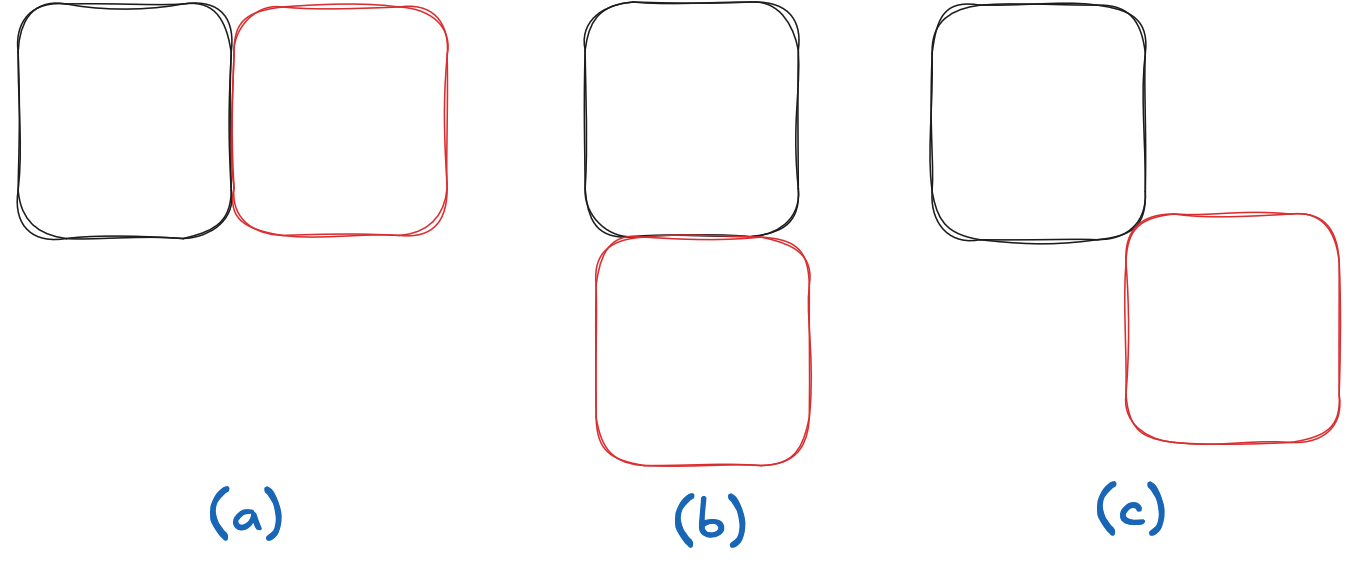
concat
Here are GeoTransform attributes for three tiles separated by 2 pixels in the X direction:
transforms = [
    "-50.0 5 0.0 0.0 0.0 -0.25",
    "-40.0 5 0.0 0.0 0.0 -0.25",
    "-30.0 5 0.0 0.0 0.0 -0.25",
]
To illustrate we’ll create 3 datasets
import pyproj
import numpy as np
import xarray as xr

dsets = [
    (i+1) * xr.Dataset(
        {"foo": (("y", "x"), np.ones((4, 2)), {"grid_mapping": "spatial_ref"})},
        coords={
            "spatial_ref": (
                (),
                0,
                pyproj.CRS.from_epsg(4326).to_cf() | {"GeoTransform": transform},
            )
        },
    )
    for i, transform in enumerate(transforms)
]
dsets[0]
<xarray.Dataset> Size: 72B
Dimensions:      (y: 4, x: 2)
Coordinates:
    spatial_ref  int64 8B 0
Dimensions without coordinates: y, x
Data variables:
foo (y, x) float64 64B 1.0 1.0 1.0 1.0 1.0 1.0 1.0 1.0Now we assign RasterIndex to all three datasets using assign_index()
import rasterix

dsets = tuple(map(rasterix.assign_index, dsets))
dsets[0]
<xarray.Dataset> Size: 120B
Dimensions:      (y: 4, x: 2)
Coordinates:
  * y            (y) float64 32B -0.125 -0.375 -0.625 -0.875
  * x            (x) float64 16B -47.5 -42.5
    spatial_ref  int64 8B 0
Data variables:
    foo          (y, x) float64 64B 1.0 1.0 1.0 1.0 1.0 1.0 1.0 1.0
Indexes:
  ┌ x        RasterIndex (crs=None)
└ yAnd… concatenate! 🪄
xr.concat(dsets, dim="x")
<xarray.Dataset> Size: 280B
Dimensions:      (y: 4, x: 6)
Coordinates:
  * y            (y) float64 32B -0.125 -0.375 -0.625 -0.875
  * x            (x) float64 48B -47.5 -42.5 -37.5 -32.5 -27.5 -22.5
    spatial_ref  int64 8B 0
Data variables:
    foo          (y, x) float64 192B 1.0 1.0 2.0 2.0 3.0 ... 1.0 2.0 2.0 3.0 3.0
Indexes:
  ┌ x        RasterIndex (crs=None)
└ ycombine_nested
Xarray supports n-dimensional concatenation through the xarray.combine_nested() API.
Here we use that to do two dimension combination:
We define a 2x3 tiling grid with these GeoTransforms:
transforms = [
    # row 1
    "-50.0 5 0.0 0.0 0.0 -0.25",
    "-40.0 5 0.0 0.0 0.0 -0.25",
    "-30.0 5 0.0 0.0 0.0 -0.25",
    # row 2
    "-50.0 5 0.0 -1 0.0 -0.25",
    "-40.0 5 0.0 -1 0.0 -0.25",
    "-30.0 5 0.0 -1 0.0 -0.25",
]
Again, construct datasets
dsets = [
    (i+1) * xr.Dataset(
        {"foo": (("y", "x"), np.ones((4, 2)), {"grid_mapping": "spatial_ref"})},
        coords={
            "spatial_ref": (
                (),
                0,
                pyproj.CRS.from_epsg(4326).to_cf() | {"GeoTransform": transform},
            )
        },
    )
    for i, transform in enumerate(transforms)
]
dsets = tuple(map(rasterix.assign_index, dsets))
And.. combine 🪄!
xr.combine_nested([dsets[:3], dsets[3:]], concat_dim=["y", "x"])
<xarray.Dataset> Size: 504B
Dimensions:      (y: 8, x: 6)
Coordinates:
  * y            (y) float64 64B -0.125 -0.375 -0.625 ... -1.375 -1.625 -1.875
  * x            (x) float64 48B -47.5 -42.5 -37.5 -32.5 -27.5 -22.5
    spatial_ref  int64 8B 0
Data variables:
    foo          (y, x) float64 384B 1.0 1.0 2.0 2.0 3.0 ... 4.0 5.0 5.0 6.0 6.0
Indexes:
  ┌ x        RasterIndex (crs=None)
  └ y